Timeline for Resolume · V2
Compose in Resolume.
Run the show from here.
OSC⚡See is a timeline-based OSC command editor for live shows. Cue control, timeline playback and real-time changes on top of Resolume, MadMapper and any OSC-capable software — no dedicated hardware.

/show/watch
Watch on YouTube →New in V2
Command Markers+
the easiest way to program your visuals
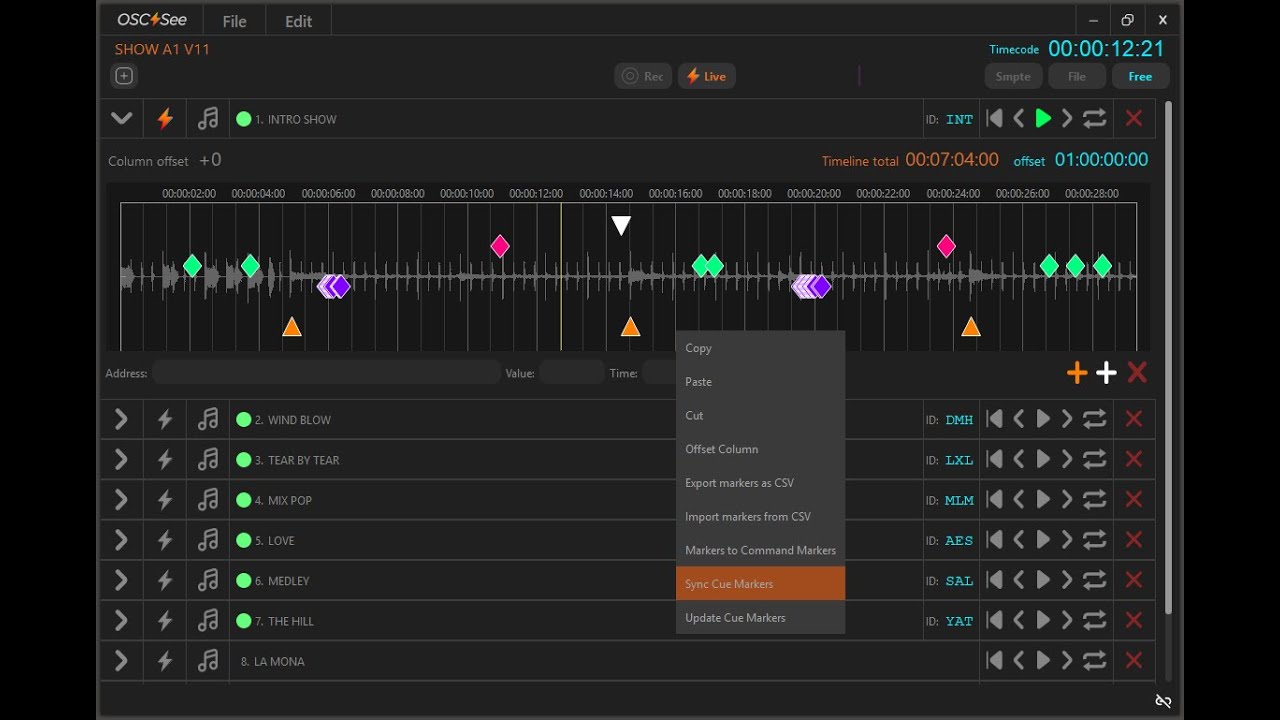
Turn timeline labels — Intro, Chorus, Drop — into executable commands for Resolume. Name the cue in OSC⚡See, hit Sync Command Markers+, and the columns link by name. Program concept-first and fill in the content later.
White plus adds a standard marker — a label, a structural note.
Orange plus adds a Command Marker+, command-capable for Resolume.
Command Markers+ are Resolume-only. General OSC keeps working with any OSC-capable software. Read the manual page.
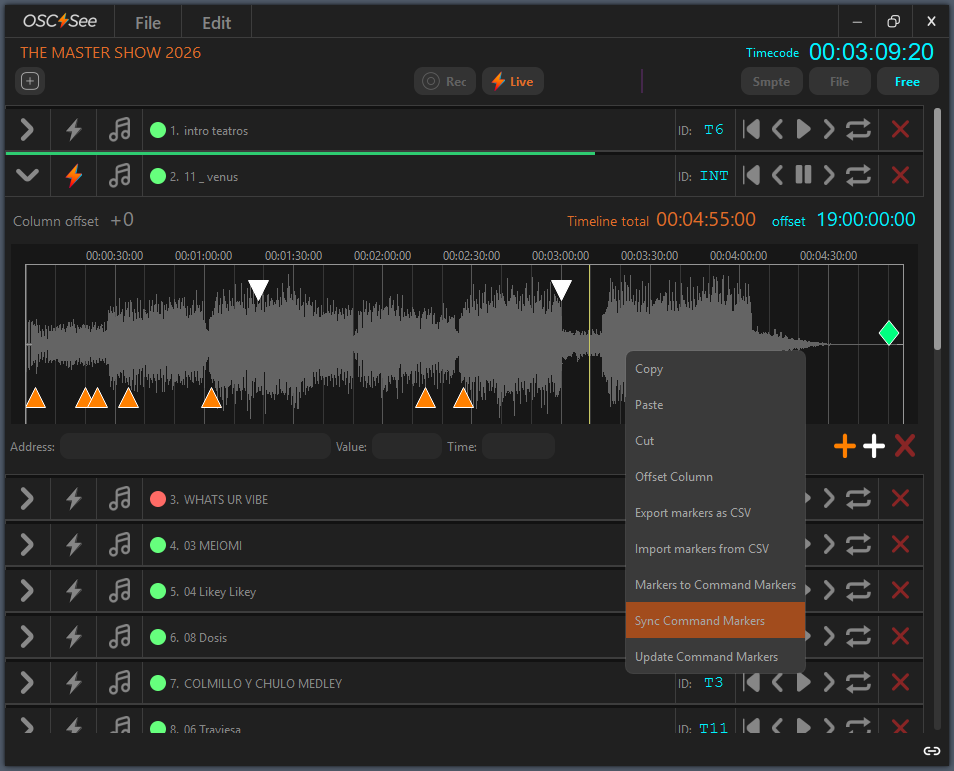
With Command Markers+
Programmed in four steps
Full manual →This is the V2 route: labels instead of column numbers, so the show is programmed by name and the content can change until the last minute.
Create a Track +
A track takes SMPTE LTC, an audio file, or free-running time. Switch whenever you want.
Create Command Markers+
Add Command Markers+ clicking the + in the timeline, name them as you want or import them from CSV.
Sync Command Markers+
Right-click the timeline. Resolume columns are created and linked by label, the traffic light turns green .
Press play
Resolume follows every cue in sync. Change the content later — the cue stays where it is.
Or use V1 mode,
record your VJ mix
First choose which addresses to listen to in the OSC Addresses window — recording only captures what is enabled beforehand, and recent versions already ship with columns, clips, decks and layer opacity active. Then arm the track with the lightning bolt, press Rec, and jam in Resolume.
Every command you fire is written to the timeline as it happens, filed under its address category and coloured accordingly, so a mix becomes an editable sequence of keyframes you can move, copy or delete afterwards.
Forget the render. Keep the cue and change the content on the fly — no waiting for a render pass, no re-export before doors.
Arm the track with the bolt, hit Rec, and jam. One track records at a time.
Cues are diamonds, Command Markers+ orange triangles, standard markers white.
Record against the waveform, run the show on SMPTE.
Trim the total, offset the whole timeline, move any keyframe.
/time/sources
Every track picks its own clock
Switch a track between the three sources whenever you want — build the cues against an audio file, then run the same track on timecode at show time.
Linear timecode over audio in
The industry reference: hours, minutes, seconds and frames carried in an audio signal, frame-accurate across film, TV and live rigs. Set the audio input in Settings first. Each track takes its own offset, so it lines up with the setlist.
An audio file drives the timeline
Import WAV or MP3 onto the track and place cues against the waveform. Set the audio output in Settings to listen while you work. On macOS only WAV files are supported.
A standalone running clock
No external reference at all — the case for installations, corporate scenes and live adjustments. Add, edit or delete commands anywhere, loop the track, and change it while it runs.
/operation/modes
Three states, one at a time
The toolbar tells you what the app is doing with OSC right now: nothing, listening, or sending.
Pan the timeline with spacebar and left-drag, or the mouse wheel pressed. Zoom with the wheel, or right-click and drag. Ctrl-click jumps the playhead where you click — plain clicks never move it, so nothing jumps by accident mid-show.
No button active. Neither records nor plays OSC — the safe state while you edit.
Records incoming OSC from your other software. Enable the address types you want in the OSC Addresses window first.
Plays the timeline out to its targets. One track at a time, so two tracks on the same timecode can never fire at once.
The one thing to remember. In Live mode, click Live on the toolbar and arm the track with the lightning bolt. Without arming, a different SMPTE-aligned track could fire instead.
Watch it run
All tutorials on YouTube →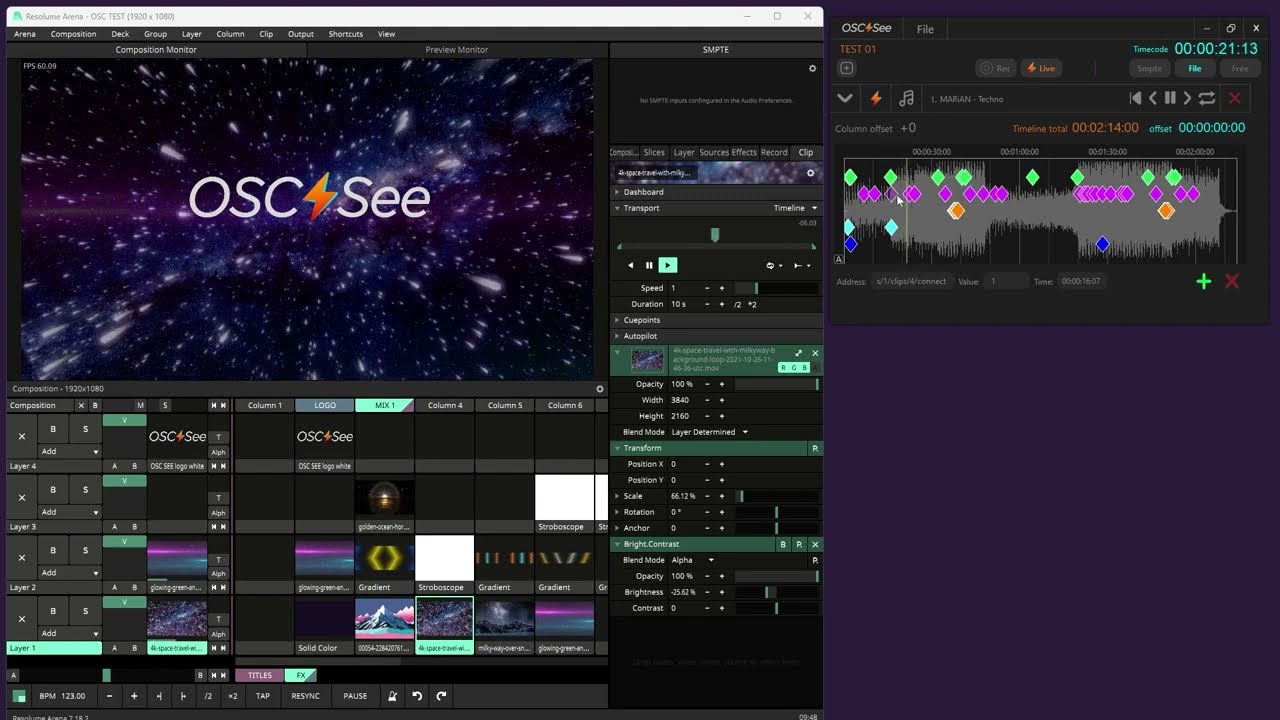
/works/with

 Resolume Arena & Avenue · Notch · TouchDesigner · Millumin · VDMX · GrandMA 3 · Beyond
“Resolume” is a registered trademark of Resolume B.V. “Millumin” is a registered trademark of Anomes. OSC See is an independent tool and is not affiliated with or approved by either.
/made/by/vjs
OSC⚡See connecting the world with OSC Protocol
We programmed our show entirely in OSC⚡See
 Camilo MejíaVideo Director, Lead Programmer · MALUMA +Pretty +Dirty world tour
We run Alejandro Sanz Tour in OSC⚡See
 Enric VilaAlejandro Sanz world tour
OSC⚡See goes Beyond!
 Trang BronsLaser Beam Factory
Incredible software! Synchronization has never been so easy.
 Luis BarreraPixelmaker
The best tool for producers and event managers ever.
 Gabriel ZapataGazeta Producciones
Intuitive and comfortable to use. If you are VJ you should try it!
 Dennis Lozado “axpire”Visualist · Don Omar, Juan Luis Guerra
/world/countries/connect
Studios and show programmers on six continents run their timelines through OSC See.
/pricing
Every feature is free. The licence keeps the output running.
Record your sequences and edit them without limits, use Command Markers+, play audio against the timeline and save your shows without paying anything. What free mode does not run is the SMPTE LTC listening, and the OSC output stops after 00:00:30:00 of playback. A licence enables both.
Windows and macOS · one licence covers 2 devices · checkout by Lemon Squeezy
The whole editor, so you can programme a full show and see exactly how it behaves before paying.
Every function active for three months, on two devices — the show machine and the spare.
A full year of shows, at a quarter of the monthly cost. Same features, same two devices.
In free mode the app never stops: you keep editing, saving and reopening. What ends after 30 seconds of playback is the OSC being sent out and the LTC being read in.
Every licence activates on two machines, so the backup laptop is covered. Move an activation from the customer portal.
Your projects stay yours and the editor keeps opening them in free mode. Renew whenever the next show needs output.
/faq
What is OSC⚡See?
A timeline-based OSC command editor for live shows: cue control, timeline playback and real-time changes on top of media servers, lighting and laser consoles.
What's new in Version 2?
Command Markers+: timeline labels become executable commands for Resolume, linked by name with Sync Command Markers+, plus a traffic light that reports sync status per track.
How do Command Markers+ work?
Name a cue, then Sync Command Markers+ from the timeline right-click menu — Resolume columns are created or linked by label. A leading * promotes a standard marker; a full OSC address makes the marker a direct command.
Can I record a live jam and turn it into a timeline in V1 mode?
Yes. V1 mode still records precise parameters and keyframes, and controls any OSC app.
What about classic editing and compositing software?
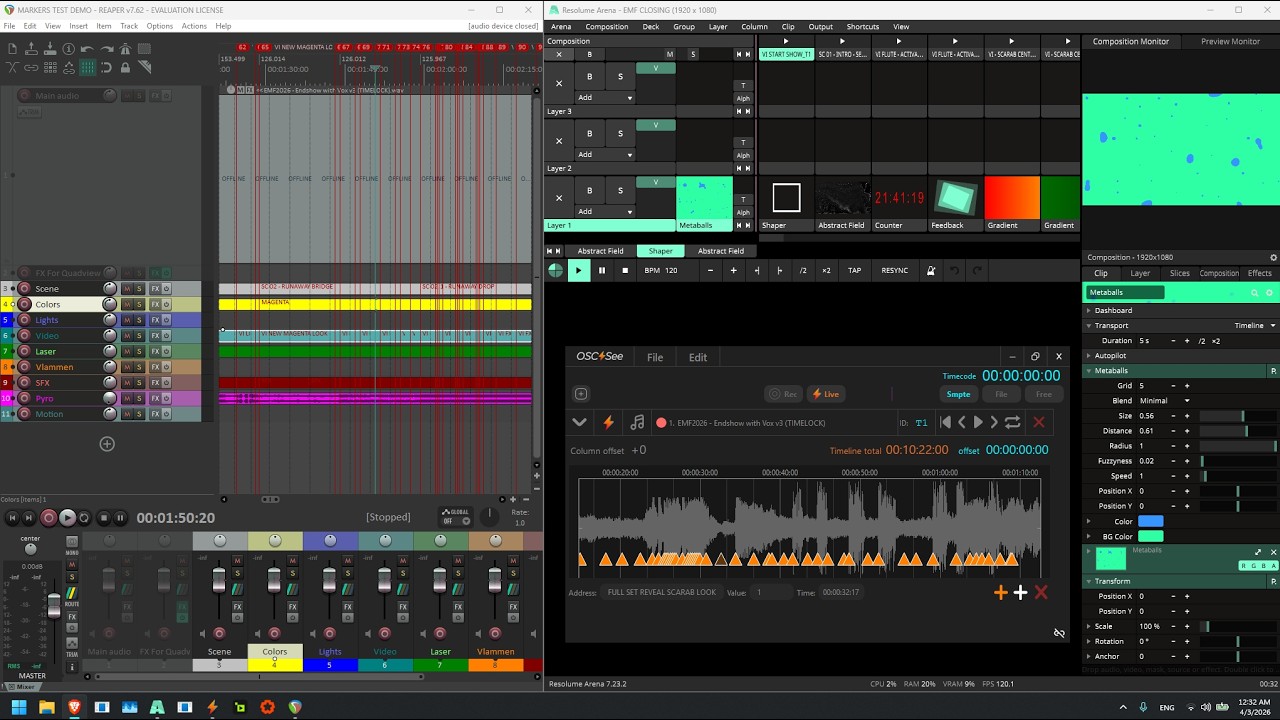
You do not need them. The show is composed in Resolume and sequenced here, so there is no render pass and no re-export: keep the cue and change the content whenever it needs to change.
Does OSC⚡See only work with Resolume?
Only Command Markers+ are Resolume-only. Custom OSC goes out to lights, lasers, other media servers and consoles.
Can I control lighting and lasers?
Yes. Any device or software that speaks OSC — GrandMA 3, Beyond, other media servers and consoles — receives custom addresses from the timeline. Markers can also carry plain text as cues for other departments.
Networking and redundancy?
Send to as many destinations as you need: add one IP and port per target, localhost for apps on the same machine and LAN addresses for other computers. That is how backups and render farms are driven. One unique IN port per app on a given machine.
Can I use OSC⚡See for free?
Yes. Free mode records your sequences and edits them without limits, and includes Command Markers+, audio playback and saving. What it does not run is the SMPTE LTC input, and the OSC output stops after 00:00:30:00 of playback. A licence enables both.
Do I need Resolume to program a show?
No. Programming, markers and timelines work on their own, and general OSC controls any capable software. Only Command Markers+ — the label-based column sync — needs Resolume.